How to check QC photos: what to look at, item by item
Updated , 7 min read
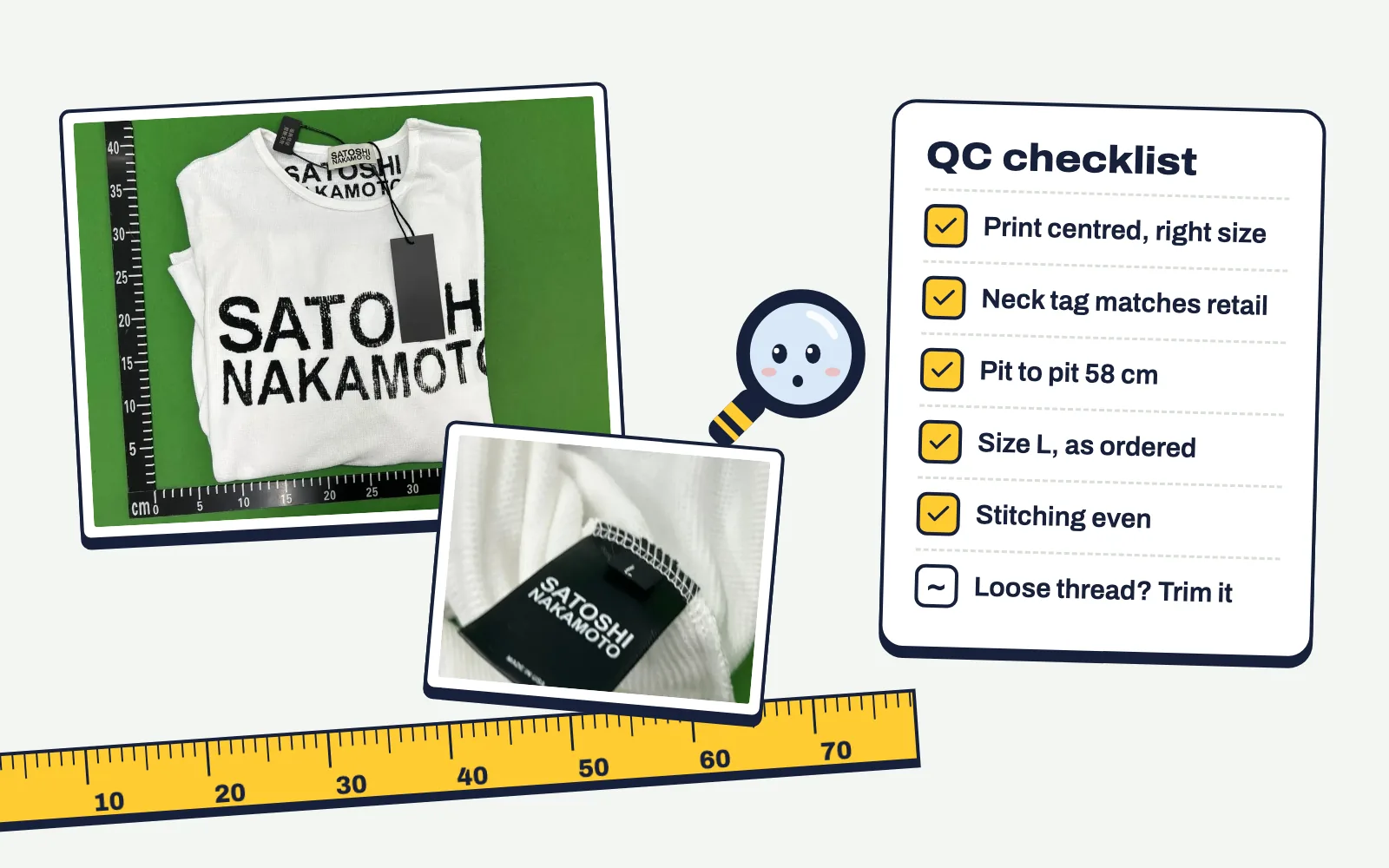
Checking QC photos is a comparison, not a vibe check. You put the warehouse photos next to something you trust and look for differences that matter. Here's how to do it for the items people buy most.
Before you start
Have three things open:
- The QC photos, on the biggest screen you have. Phone screens hide loose threads.
- A reference: the brand's own product photos, or albums from other buyers in QC Finder.
- The listing's size chart, with the one or two measurements you care about.
Warehouse lights are bright and cool. Whites look blue, cream looks grey, black looks faded. Judge colour against something in the same photo you know is white, like the paper tag or the table.
T-shirts and hoodies
- Print or embroidery. Is the logo centred and the right size compared with the chest width? Are letters evenly spaced? Embroidery should be dense with no gaps showing fabric underneath.
- Neck tag and wash tag. Fonts, spacing and sizes are where batches differ most. Compare with retail photos.
- Measurements. Pit to pit is measured flat, armpit seam to armpit seam. Compare it with the size chart and with a shirt you own that fits. A centimetre or two off is normal.
- Fabric. Ribbing at the cuffs and hem should look tight. Very shiny or thin-looking fabric shows up even in warehouse light.
Sneakers
- Shape from the side. The toe box height and the heel curve are the first things people notice when you wear them. Compare the side profile with retail.
- Toe box from the front. Look for a boxy or sunken toe compared to retail pairs.
- Stitching. Even spacing, no double stitches, no glue stains along the midsole.
- Box label and insole. Right size printed on both, and matching the size you ordered.
- Left vs right. Asymmetry between the two shoes is a common real flaw. Put the photos side by side.
Bags and accessories
- Hardware. Zips, buckles and engraved logos should be crisp, not blurry or uneven.
- Edges and stitching. Painted edges should be smooth, stitching straight and evenly spaced.
- Pattern alignment. On monogram or check patterns, see how the pattern meets at the seams.
- Dimensions. Bags are often photographed with a tape measure. Check width and height against the listing.
What counts as a real problem
Some things look bad in QC but don't matter: a loose thread you can trim, creases from packing, glue smell (you can't see it anyway). Others are worth sending back: the wrong size, a different colour from what you ordered, holes, stains, a crooked print, or one shoe clearly different from the other. If you're unsure, our guide to GL and RL explains how to decide.
Ask for more photos
Agents will take extra photos on request, sometimes for a small fee. Ask for a specific angle ("close-up of the neck tag", "side profile of both shoes on a flat surface") rather than "more photos". Specific requests get useful pictures.
Questions
What does pit to pit mean?
The width of a top measured straight across the chest from one armpit seam to the other, with the garment lying flat.
Why do colours look wrong in QC photos?
Warehouse lights are cool and bright, so whites turn blue and darker colours look faded. Compare against something white in the same photo.
Are small loose threads a reason to return?
Usually not. Trim them at home. Returns are for wrong sizes, wrong colours, holes, stains or obvious defects.